SCHEDULE REVIEW INTELLIGENCE

Your tools can tell you what changed.They can't tell you what it means.

Construction schedule review software for owner-side professionals. Upload a P6 schedule, get a defensible read of what it means, while there's still time to act.

What the contractor's XER shows: 27 activities added, 5 deleted, 9 added to the critical path, 12 logic ties changed, constraints added, and a 61 working-day milestone slip with a delay claim filed. What IPSYS tells you: the completion milestone slipped 61 working days; the contractor ties most of it to new scope that wasn't in the last update, and the measured variance agrees, but the float absorbing it comes from the new logic, not real recovery. So how does the date hold if one moves? Bounded by AACE Recommended Practices; authored by you: add, refine, or overrule any finding.

Schedule changes converge on IPSYS and fan out into a plain-language findingRaw schedule-change metrics on the left flow into a central IPSYS hub and fan out on the right as an interpreted, plain-language finding, bounded by recognized practice and authored by the user.WHAT THE XER SHOWSactivities added+27activities deleted−5added to critical path9off critical path3logic ties changed12constraints added4milestone slip61 wddelay claim filedyesNumbers. Someone still has to read them.IPSYSINTERPRETATIONWHAT IT'S TELLING YOUThe completion milestoneslipped 61 working days.The contractor ties most of it to newscope that wasn't in the last update,and the measured variance agrees.But the float absorbing it comes fromthe new logic, not real recovery.So: how does the date hold if one moves?
Try it free, start with Step 1

Bounded by AACE Recommended Practices: interpretation that won't wander.

Authored by you: add, refine, or overrule any finding. Your judgment is the final word.

For

Program Managers Owner's Representatives Project Controls Leads Capital Project Advisors Senior Schedulers

…at firms whose names go on the report.

What makes a schedule review hard.

  • The schedule update is one of fifteen things on your desk.

    You don't always have the hours to take it apart before the meeting, and you shouldn't walk in unprepared because of it.

  • Doing it by hand means a different tool for every question.

    Baselines and comparisons in P6, change analysis in one utility, the numbers in Excel, the narrative in Word. Then you assemble it yourself, every update.

  • This update only makes sense next to the last one.

    Reconciling what the contractor submitted last period against this one usually means digging through a paper trail by hand.

Your numbers · Your math

What does the current review really cost you?

Adjust the sliders to match your practice. The math isn't ours. It's yours.

Most owner-side reviewers are spending 40+ hours a month on mechanical review they could reclaim.

$250
$75$350
12 hrs
4 hrs40 hrs

DCMA-14, change detection, EVM check, WBS audit, narrative write-up: the full review cycle.

4
120

Per project, or across the portfolio you cover.

Hours reclaimed / month
44
1.1 weeks of analyst capacity returned
Labor value reclaimed / month
$11,004
Hours reclaimed × your billable rate
Annualized
$128,460
Labor value reclaimed × 12 months

Math assumes IPSYS replaces roughly 90% of the mechanical review: DCMA-14, change detection, longest-path discovery, WBS audit, EVM checks, draft narrative generation. Your judgment still drives the final 10%, where it should. Step 1 is always free. Bring a real schedule to a working session and we'll show you the rest.

Monday morning, two ways

What the schedule review feels like: before and after.

Without IPSYSThe week you lose
  • Review cycle12 hours of manual review per update
  • ToolingExcel pivots, screenshots, copy-paste from P6
  • In the meeting“Let me get back to you on that.”
  • FindingsBuried in a 40-page appendix nobody reads
  • NarrativeRe-keying the same monthly write-up by hand
  • Defensibility“Trust me, I checked it twice.”
With IPSYSThe afternoon you keep
  • Review cycleMechanical pass in minutes; expert review in an afternoon
  • ToolingXER in, Word-ready narrative out, version-controlled
  • In the meetingFloat path on 50 milestones, on screen, severity-ranked
  • FindingsTriaged by severity, meeting-ready in the first three pages
  • NarrativeMulti-audience report drafted from your data, edited by you
  • DefensibilityAACE-aligned, audit-trail attached, your name on every page
Three jobs · One workflow

IPSYS doesn't replace a check. It replaces the cycle.

Every capability below works alone. They earn their keep working together, across the seven-step review you already do, just compressed into the afternoon you actually have.

01

Know what changed, and what it means, the moment a new XER hits your inbox.

Period-over-period change detection, milestone drift, and float path shifts surfaced and severity-ranked before you've finished your coffee. You walk into the kickoff already knowing which conversations will actually matter.

  • Intelligent change classification scores every modification by impact, so you triage in minutes, not hours.
  • Milestone variance trending tracks drift across multiple updates so a slow-creeping slip becomes obvious before it becomes a claim.
  • Multi-path float analysis evaluates up to 50 float paths at once: the true critical path and every near-critical one waiting to bite.
02

Walk into any review meeting with the contractor's actual story in your hand, not the one they're about to tell you.

Drop in the contractor's XER. See what they progressed, what they changed, and where they're tracking against last month's update, before they walk you through their narrative. You stop reacting to the contractor's version of the period. You start running the meeting with questions backed by evidence they can't paper over.

  • Period-over-period progress analysis shows what got executed since the last update: earned activities, completed milestones, where the work actually advanced.
  • Variance against the previous update flags activities tracking behind their prior dates, so the gap between what was projected last month and what was delivered is on the table before the contractor frames it.
  • Schedule logic and constraint changes highlight every relationship, lag, or constraint the contractor modified: the edits that change the schedule's behavior without changing its activities.
03

Replace the entire monthly review cycle with a 7-step workflow you actually trust.

From XER upload to signed-off narrative, version-controlled end-to-end, with you in the loop at every gate. Not automation that bypasses your judgment, but automation that extends it.

  • Smart Schedule Wizard runs all seven steps in one progressive flow: upload, validate, analyze, narrate, review, export, archive.
  • Version-controlled outputs mean every report is reproducible, comparable, and tied to the exact XER that produced it.
  • Built to extend your judgment: review every recommendation, then accept, edit, or reject. It drafts. You decide.
Ask IPSYS · Contextual learning

The output isn't the end. It's where the conversation starts.

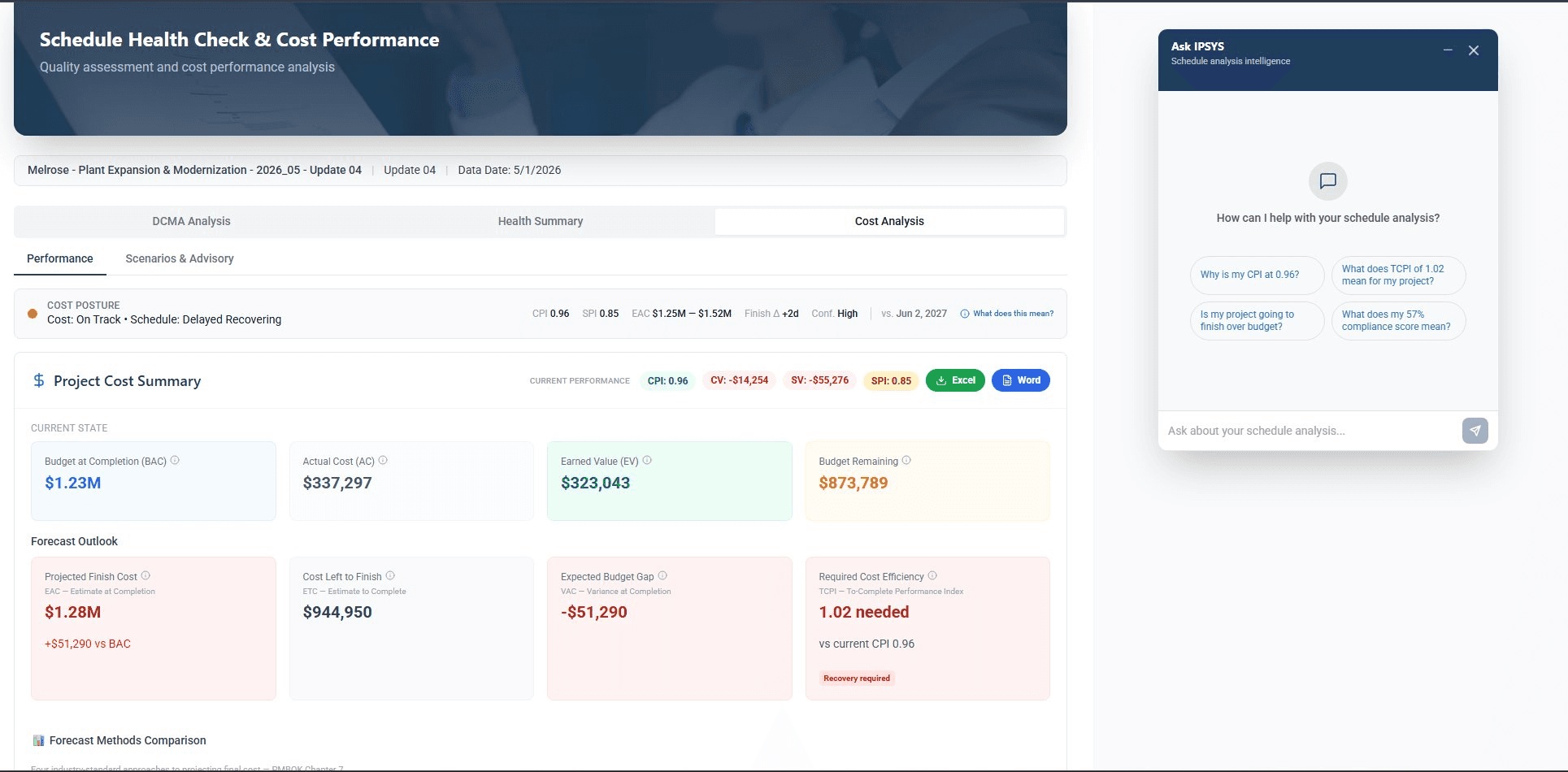
Every finding in your review is one click from a plain-English read on what it means for your project. Not a help doc. Not a generic tooltip. A real interpreter loaded with your actual numbers, ready to explain CPI, TCPI, float erosion, or any DCMA flag in the language you'd use with an executive.

You already have dashboards. What you don't have is the read on what they mean for this project, in language you'd use in a meeting.

“Why is my CPI at 0.96?”
Reads your actual cost data, not a textbook.
“What does TCPI of 1.02 mean for my project?”
Plain English, tied to your forecast.
“What does my 57% compliance score mean?”
Connects DCMA findings to consequences.

We're not just automating the analysis. We're building the bench. Every report becomes a teaching moment: the analyst who clicks “Ask IPSYS” today is the senior advisor on your team in five years.

IPSYS Analytics Cost Analysis dashboard with Ask IPSYS panel open, showing cost performance metrics and contextual AI-suggested questions for the Melrose Plant Expansion project
Preset prompts seeded by what's on screen, or ask anything in your own words.
35+
Years CPM practice
Live
Production deployment, monthly reviews
SOC 2
Type I certification in flight, Sept 2026
Patent
Pending: 7-step methodology
Where we are today

In production with senior controls professionals on real commercial projects. SOC 2 Type I certification is in flight for September 2026. Presented at the AACE Metro NY 2026 chapter meeting and the AACE Northeast 2026 Symposium.

We'd rather start with a working session on one of your actual schedules than a sales pitch.

Risk-free, no card

Upload your XER. See it the way IPSYS reads it.

Step 1 is free. Import the XER and get a structural read on your WBS: depth, decomposition, naming, hierarchy quality, critical-path density. Paste in the contractor's narrative and watch IPSYS parse it into auditable items. Walk away with a written summary, tuned to your audience, exportable to Word. Same afternoon, no card. Schedule Health (DCMA & cost), Change Detection, Longest Path, Milestone Variance, the Gantt View, and the Executive Summary: that's what Steps 2 through 7 are for.

Upload your XER

If what comes back matches what you already suspect, you've validated. If it doesn't, you've learned something the metrics didn't tell you.

No credit card · Your file, your data, your control